

Checked against the app: 20 November 2026Read as Markdown
Pay anyone: an Onyx customer by phone number, any wallet by address.
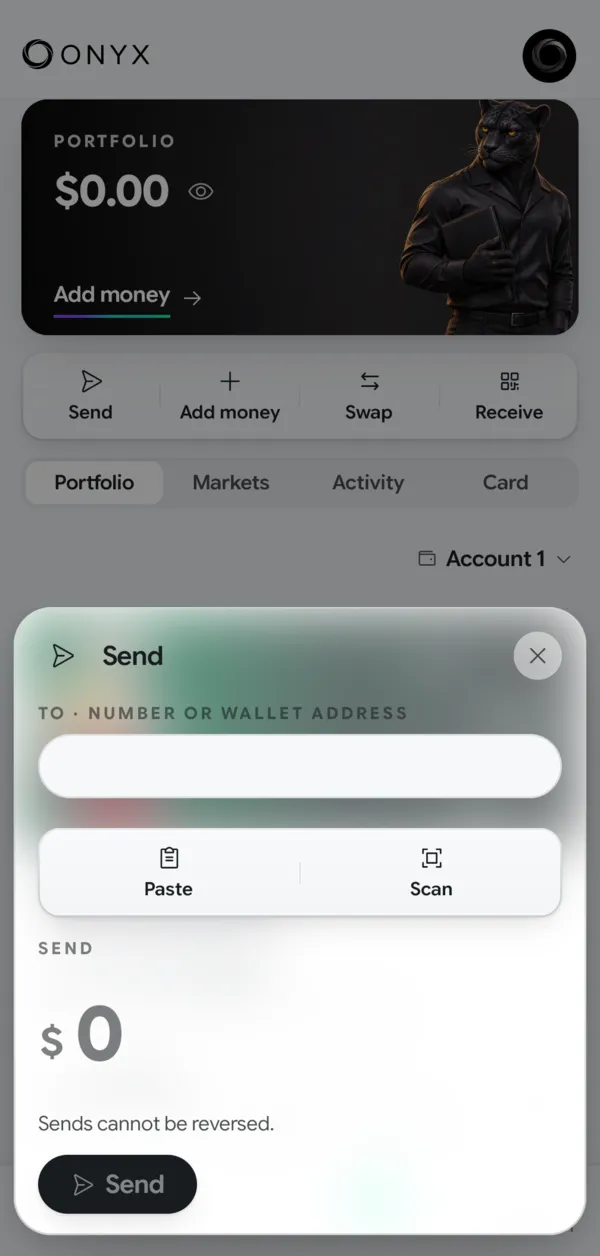
Send in five steps
- Open Wallet and tap Send.
- In To · number or wallet address, type a phone number, or tap Paste or Scan for an address.
- Enter the amount in dollars.
- Check the review: Account, To, Fee and From.
- Tap Send and confirm with your face, fingerprint or passcode.
Before you confirm
- Account: Onyx account, or Invitation by text for a number not on Onyx yet. They get a text to claim it.
- Fee: the cost, in dollars. No coin for the network fee? Onyx swaps a little in from what you hold, same tap: "Uses $0.40 of your USDC".
- Sends cannot be reversed. Check the name or address, and the network.
Your chat gets the card
Send to one of your Onyx contacts and the payment card lands in your chat with them too, as if you'd paid from the chat. No chat yet? Onyx starts one. Sends to a number or an address don't post a card.
If something stops you
| Message | What it means |
|---|---|
| Not enough balance for this send. | Lower the amount, or add money first. |
| Not enough SOL for the fee. | Add a little SOL or USDC and try again. |
| That's your own Onyx wallet. Send to someone else's address. | You pasted one of your own addresses. |
| They don't have a wallet for this token yet. | The recipient's wallet can't hold this token. Send USDC or SOL instead. |
| A new wallet needs at least 0.00089088 SOL. | Solana's minimum for a new address. Send at least that. |
| Review expired. Start a new review. | Prices moved while you waited. Review again. |
Common questions
Can I cancel a send?
No. Confirmed is final. Wrong person? Ask them to send it back.
Can I send to someone without Onyx?
Yes. Paste their address, or use their number: they get a text to claim it.
How long does it take?
Seconds on Solana and Sui, under a minute on Ethereum, ten minutes or more on Bitcoin.