

Checked against the app: 24 November 2026Read as Markdown
Your network. Your people. Your wallet.
- Mobile network: eSIM data in 202 countries and 10 regions, plus a US number for calls and texts.
- Chat: encrypted messages, groups, calls and your texts, in one inbox.
- Wallet: crypto, stocks and dollars only you control. Pay anyone in a chat.
No ID. No trackers. No ads.
Where to get Onyx
| Platform | Status |
|---|---|
| Web | Live at app.onyxmobile.net. Open to everyone. |
| Android | Test builds for invited testers |
| iPhone | Not available yet |
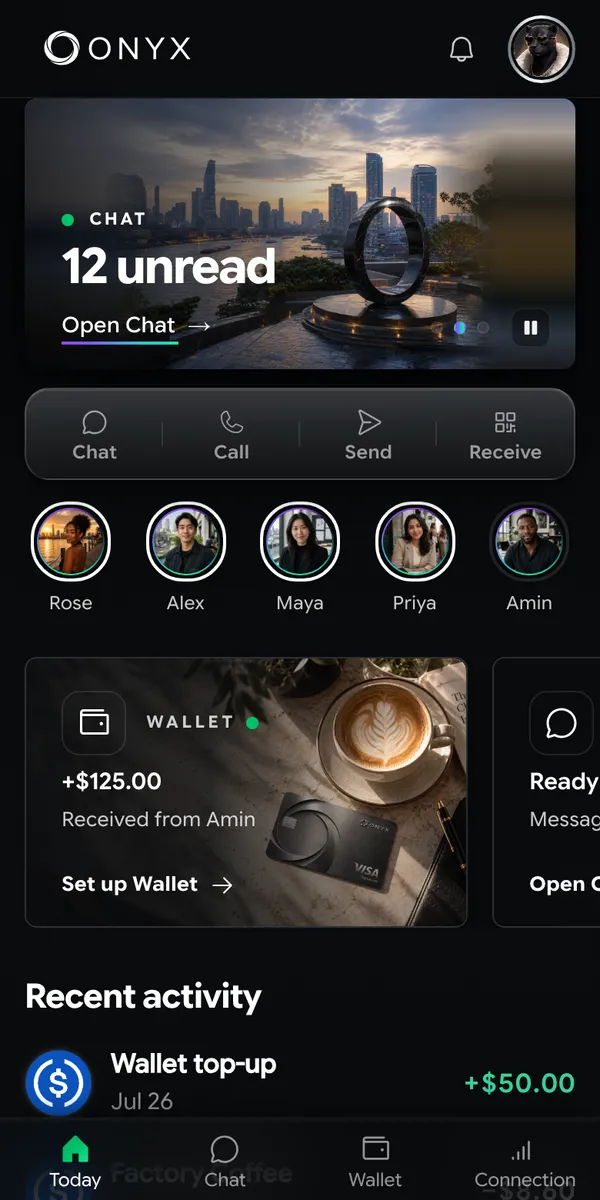
Start here
- Create your account and sign in
- Find your way around
- Choose a plan and install your eSIM
- Set up your wallet
The four tabs
| Tab | What it's for |
|---|---|
| Today | What needs you now, your plan's status, recent activity and shortcuts |
| Chat | Onyx chats, groups, contacts, calls, voicemail and texts |
| Wallet | Your balance, Send, Add money, Swap, Receive, Markets and Activity |
| Connection | Your eSIM, data usage and phone number |
First questions
Is Onyx a phone carrier?
Onyx gives you data, and a US number if you want one, through an eSIM on local networks. Your current SIM stays.
Does Onyx hold my money?
No. Your recovery key (12 words) holds it, on your phone. Onyx can't move, freeze or recover it. See How your wallet works.
Can Onyx read my messages?
Not in direct chats or private groups. They're end-to-end encrypted. Communities are public. Privacy lists exactly what Onyx keeps.
How do I reach a person?
Email support@onyxmobile.net, or open Settings › Help & support. Get help.